

Run every incident from one live map.
The Command Post on the wall, the laptop in the truck, and the iPhone in every responder’s pocket — one live map, one timeline, one push-to-talk channel. Hundreds of personnel, hundreds of assets, the same picture updating the moment anything changes.
30-day trial · every module on · no credit card. Or call (813) 723-7944.
- One map
- Shared operational picture
- Web + iOS
- Same map, every device
- QR + invites
- Join the right incident
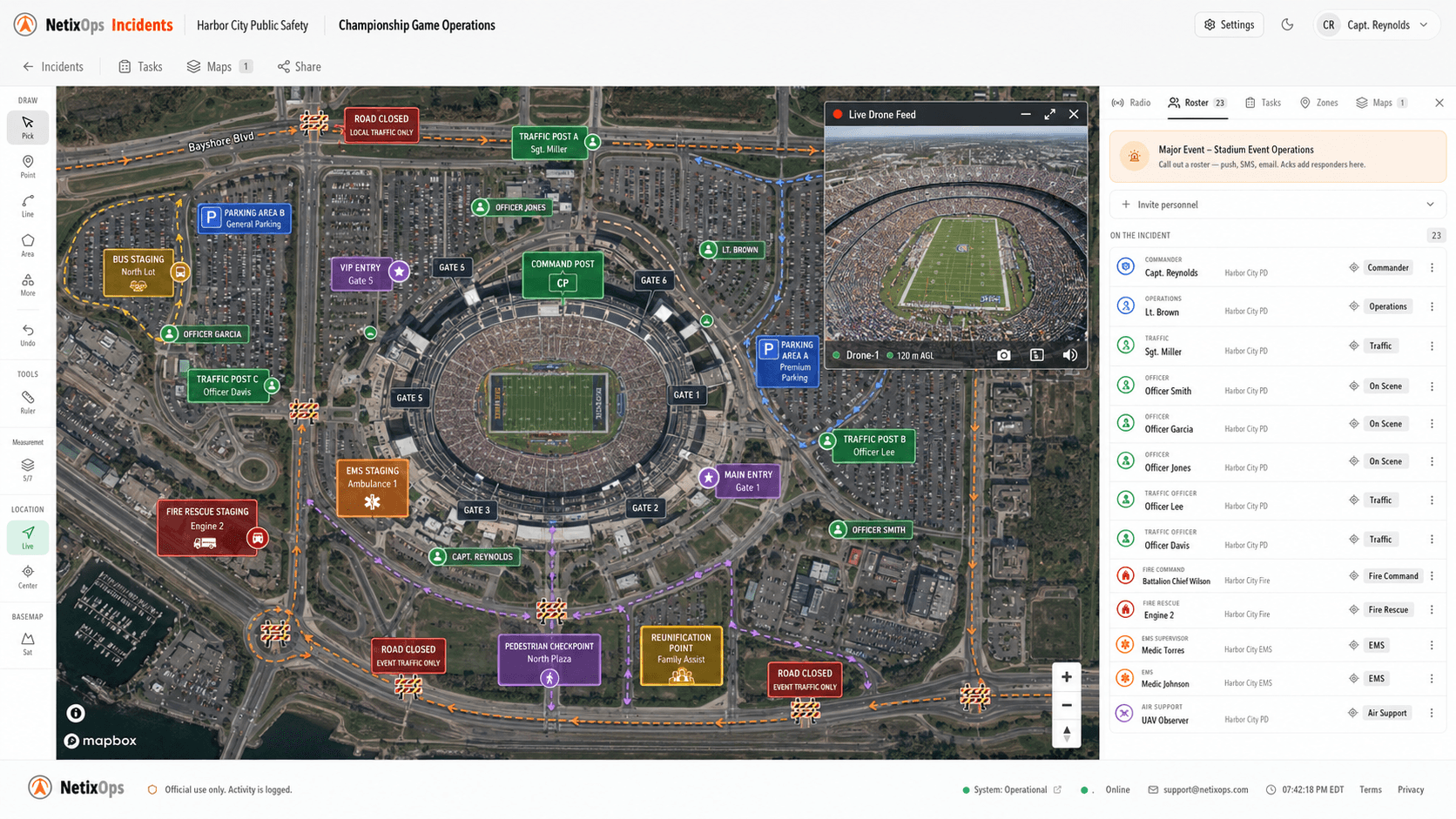
One console for the canvas, the people, and the comms.
Everything you need to run the response — the map, the live feeds, every position, the chat, the audit trail — in one console built for the scale a real incident demands.
Map-first command
Pin the scene, draw zones, lay routes. Every responder works off the same canvas — no whiteboards photographed and texted around.
Live drone & camera feeds
Stream UAV video onto the map alongside fixed cameras and operator views. The commander sees the same frame the pilot is flying.
Drone-map overlays
Fly a survey, upload the photos, and the orthomosaic drops onto the live incident map in minutes. Plan from the actual ground truth — not last year’s satellite imagery.
Personnel & asset tracking
Every drone, vehicle, K-9 team, and foot patrol on one map. Position updates are battery-aware so phones don’t cook in the field.
Bring your team together
Coordinate personnel and assets in a shared workspace. Plan your rollout with our team around your agency’s size and operating needs.
Any device, same canvas
Phone in the field, laptop in the truck, large display at the Command Post. One live view, three form factors, zero translation.
QR sign-in at the Command Post
Print the QR, post it at the entry tent, and personnel scan onto the right incident in seconds. No passwords typed, no shared accounts.
Individual accounts and roles
Individual sign-in with organization and incident roles. Control who can view, manage, and contribute to each operation.
Chat, files, and full audit
Threaded messages, image and document sharing, push notifications, and an append-only event log — the comms record survives the operation.
Built for the agencies that show up first.
Police, fire, EMS, emergency management, public works, event-security teams. If you stand a Command Post up at least once a year, this page is for you.
Law enforcement
PD · Sheriff · State
Commanders run protests, manhunts, and dignitary details with every officer's position, drone feed, and intel pin on one map. SROs read the same picture the patrol captain does.
- K-9 + air unit tracking on one canvas
- Restricted incidents for sensitive ops
- QR sign-in for mutual-aid responders
Fire & rescue
Career · Combination · Volunteer
ICs annotate the structure during size-up, mark hose lays + RIT staging, and stream tablet PTT so the engine boss talks to the truckie without keying a portable.
- Drone orthomosaic dropped on the incident in an hour
- Apparatus icons stamped with company callsign
- Append-only timeline for the NIOSH-style after-action
EMS
Third-service · Hospital-based · Volunteer rescue
Coordinate staging areas, landing zones, and responding teams on a shared incident map. Keep operational notes and assignments alongside the scene.
- Shared operational notes and team assignments
- HLZ + DLZ specialty markers with footprint scale
- Notify rosters for off-duty medics with one tap
Emergency management
City · County · State
EOC chiefs run multi-day events across agencies — mutual aid, planning units, public works — all on the same fused picture. Status changes propagate without a phone tree.
- Mutual-aid sharing across tenants, both directions
- Public share links for utilities + insurers
- Org-admin role separates dispatch from comms
Special events
Stadiums · Parades · Concerts · Fairs
Preplan the venue with annotated barricades, sniper posts, and evac lanes; then run the event with C-UAS feeds and a live PTT bridge across every contributing agency.
- TFR perimeters drawn once, scaled to venue
- C-UAS feed fusion (AeroScope, Sentry, DroneShield)
- Roster activation by specialty (EOD, K-9, hazmat)
Public works & utilities
Storm response · Roadway · Power
Damage triage flights produce a structure-by-structure orthomosaic the city's crew chiefs route off of — no GIS shop in the loop.
- Per-structure drone overlay, share-by-link to crews
- Measurement tool for clearance + cut planning
- Choose modules and seats for your team
Talk to the whole team without a radio.
Push-to-talk voice over the data network you’re already on. Hold the orange button and your voice lands on every phone, laptop, and Command Post display on the call in under a second. No frequencies to coordinate, no repeaters to maintain — just the people on the incident.
Half-duplex, radio-style
Hold the button to talk, release to listen. The button glows red while you're hot — no doubt who's keyed.
Time-sensitive lockscreen alerts
Pushes break through iOS Focus and Silent at Apple's time-sensitive tier. Tap the notification and you land in the incident with the channel already joined.
24-hour playback archive
Every transmission auto-records and stays available for a day. A late-joining commander can scroll back through the entire talk-around.
Per-incident enable
Off by default. Commanders flip one toggle to open the channel — quiet calls never surface a mic UI to the team.
Sub-second latency
Audio routes through a regional edge server, not a national backhaul. Typical end-to-end is under 700 ms — quicker than most consumer P25 patches.
Cross-agency channels
When mutual aid links two tenants on a scene, PTT bridges automatically. Your engine crew hears the host agency's incident commander on the same key, no patch-through needed.
- Mouth-to-ear
- < 1 s
- edge-routed audio
- Replay window
- 24 h
- auto-archived
- Hardware
- 0
- to deploy
PTT is ON
Hold to talk · 7 listening
3 transmissions · 24-hour retention
just now
32 s ago
1 min ago
3 min ago
Call out specialty teams in one tap.
When a scene needs the bomb squad, dive team, or your off-duty K-9 handlers, you don’t want to chase phone numbers. Pick the roster, write the call-out, fire it. Members get a push and email at the same instant, ack with one tap, and the activation board fills in who’s en route — without anyone leaving the incident map.
Activate a roster
Rosters
Title
Suspicious package · gate B-3
Body
Unattended duffel near concession. PD has set up a 50ft cordon. Need EOD on scene ASAP.
Delivery · 6 of 8 acknowledged
Specialty rosters
Bomb squad, hazmat, dive team, SWAT — anyone called by name rather than dispatched by zone. Primary / backup / member positions, color-coded for fast scanning.
Four severity tiers
Info, normal, urgent, critical. Severity drives icon, color, push priority, and whether the alert breaks through Silent mode.
One-tap acknowledgement
Recipients respond with one tap — Responding, Acknowledged, or Unavailable. The supervisor watches the count tick up live as the team answers.
Multi-channel delivery
Push and email fan out in parallel. Per-recipient delivery status lands in the activation board so you see exactly who got which channel.
Drop a drone map onto a live incident — in real time.
Send a pilot up, upload the photos, and minutes later the orthomosaic is sitting on top of the incident map for every responder to plan against. Built for event planning, large operations, and any scene where the conditions on the ground have already outrun the satellite imagery. Make the plan from what’s actually there — and our state-of-the-art planner puts the entry teams, barricades, landing zones, and command vehicles on the canvas at true real-world scale.
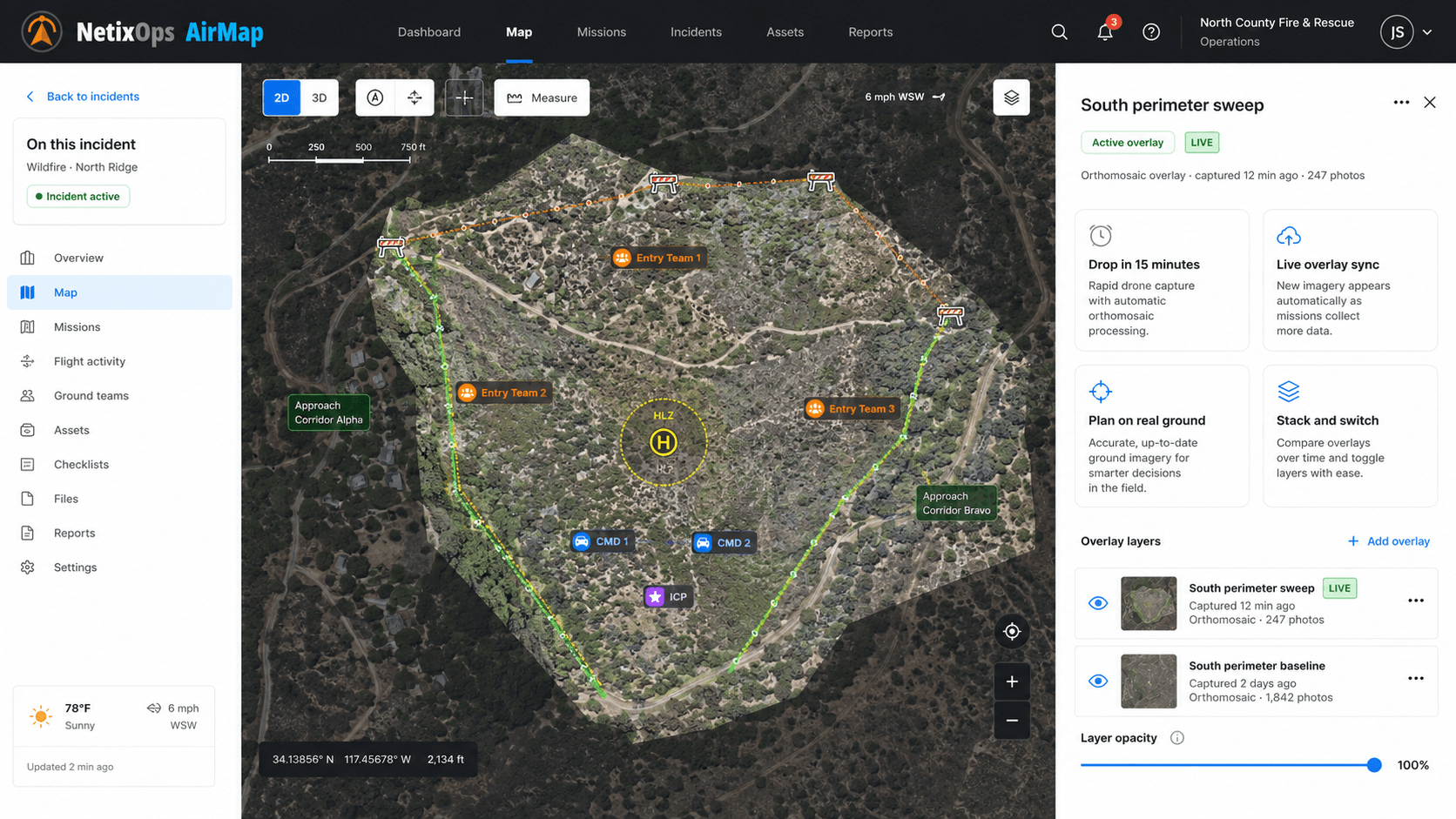
Drop in 15 minutes
Pilot launches, flies a grid, lands. Upload the SD card straight from the truck — the orthomosaic processes in the cloud and lands on the incident map automatically.
Live overlay sync
Assign a map to an incident and it shows up for every responder on the canvas in real time. No emailed PDFs, no “refresh your tab” — commanders see the same ground truth the pilot just captured.
Plan on real ground
Drop entry teams, mark barricades, draw approach corridors, place HLZs and command vehicles right on top of the orthomosaic at true scale. Vehicles render at real-world dimensions — verify a Command Bus fits the lot before the briefing.
Stack and switch
Layer multiple drone maps on one incident — yesterday’s baseline plus today’s post-storm sweep. Toggle each overlay from the rail, fly between footprints with one click.
Event & large-area ops
Race courses, stadium perimeters, festival grounds, wildfire flanks — anywhere your basemap can’t keep up with conditions on the ground. Re-fly between days and replace the overlay in place.
Tenant-scoped, NetixOps-managed
Maps live inside your tenant with role-gated access. Processing and tile hosting are bundled — no Mapbox account, no ODM server, no GIS specialist required.
Get a workspace for your agency in minutes.
Sign up with your work email, click the verification link, and your team is in a real NetixOps workspace at demo-YourAgency.netixops.com. 30 days, all modules on, no card.
Counter-UAS, fused into one map.
Bring every C-UAS sensor you already own — DJI Aeroscope, Anduril Sentry, DroneShield, Echodyne, AeroDefense — into a single live picture. Overlay ADS-B, register your own Skydio and DJI fleet as friendlies, tag problematic drones, and share the picture with mutual-aid partners next door.
From first call to after-action in one place.
Three stages, one URL. Spin up an incident, run it live with the whole team, then close it with a full timeline ready for review.
- 01
Open and invite
Create the incident, post the join QR at the Command Post. Personnel scan with their phone, sign in, and join the incident using their own account.
- 02
Coordinate live
Stream drone feeds, track every position, annotate the canvas, talk in-thread, key PTT. The whole team — phones, laptops, the Command Post display — works off the same frame.
- 03
Close and review
Lock the incident with a full timeline of every position update, message, annotation, transmission, and status change. Ready for after-action review the moment it’s closed.
Built for public safety — and the rules that come with it.
Agencies hold sensitive operational data. NetixOps treats that seriously: US-resident infrastructure, hardened defaults, and an audit trail that survives the operation.
US-only data residency
Primary database, file storage, backups, and logs all live in US-East AWS regions. Nothing leaves the country, ever.
Encrypted in transit and at rest
TLS 1.3 on every connection, AES-256 on every disk. Attachments are signed-URL only — no public buckets, no permalink leaks.
Daily backups, point-in-time recovery
Automated daily snapshots plus point-in-time recovery to any moment in the last seven days. Backups are encrypted and US-resident.
Row-level isolation per tenant
Postgres row-level security gates every read and write by tenant. Explicit mutual-aid sharing controls access for partner agencies.
Append-only audit trail
Every status change, member add, annotation, message, and PTT key lands in an event log tied to the actor and the incident.
Granular, revocable roles
Commander · Responder · Observer per incident, plus tenant- and platform-level admin tiers. Sessions are short-lived and revocable from a single screen.
Choose your modules. Size them for your team.
Pricing is based on your user count and the modules you select, with an annual minimum for each module. Bundle discounts and monthly or annual billing are available. Contact sales for a quote with your rates, processing limits, and support scope.
Incidents
Coordinate your response
Per user · selected module- Live incident maps and personnel
- Push-to-talk, chat, and activity timeline
- Tasks, zones, and mutual-aid sharing
Airspace
See your operating area
Per user · selected module- ADS-B aircraft and flight trails
- Connected agency drones
- Remote-ID detections and tagging
Notify
Reach the right team
Per user · selected module- Specialty rosters and activations
- Push, email, and configured SMS/voice
- Acknowledgements and escalation
AirMap
Map the scene from the air
Per user · selected module- Drone photo processing
- Annotations, sharing, and PDF export
- Processing limits specified in your quote
Special pricing for small volunteer agencies
Volunteer fire departments, search-and-rescue teams, CERT chapters, and other non-profit responder organizations with fewer than 100 members qualify for discounted pricing. Contact sales for details and we’ll set you up.
Common questions from procurement.
Does this replace our CAD?
No — we sit alongside it. CAD is where the call gets dispatched; NetixOps is where the responders actually coordinate once they're on scene. The two integrate cleanly: we can pull initial call data via API or you can paste the call number into a new incident.
What about ESRI / GIS shop maps?
Your GIS shop's basemaps and parcel data are first-class layers in NetixOps. We don't try to replace ArcGIS — we replace the gap between the GIS map nobody opens during an incident and the paper map taped to the wall.
How is this different from a Slack channel + WhatsApp + a Google Doc?
It's purpose-built for incident command: one map, one timeline, role-based permissions, push-to-talk, time-sensitive lockscreen alerts, append-only audit trail, drone overlays, mutual-aid sharing. The free tools each get one of those right; running an incident on a mix of them is how details fall through the cracks.
On-prem or cloud?
Cloud is the default — we host in US-East with daily backups + point-in-time recovery. State / federal customers on our top tier can deploy on-prem or in their own VPC. We don't recommend on-prem for smaller agencies because the operational burden outweighs the value.
How long does it take to onboard?
Most departments are running a real incident on NetixOps within a week. We provision your tenant the same day, walk one shift through it in a 45-minute training, and stay on the line for your first three incidents.
What hardware do responders need?
An iPhone or any modern Android phone for the responder app, plus any device with a browser for commanders (laptop, iPad, the Command Post display). No radios, no GPUs, no MDTs required — though we play nicely with all of them.
Can other agencies see our incidents?
Never by default. Each agency lives in its own isolated tenant with row-level security at the database layer. The only time cross-agency visibility happens is when YOU explicitly invite a mutual-aid partner to a specific incident, scoped to just that incident, revocable at any time.
What about data retention + open records?
Every action on an incident lands in an append-only event log we never delete. Standard retention is 7 years; FOIA / public-records exports come back as a single ZIP with the full timeline, attachments, drone maps, and chat history.
Different question? Ask us directly — we’ll answer in the first call.
Let’s deploy NetixOps for your agency.
Spin up a self-serve 30-day trial right now, or book a live demo on your own data with our team — same lead, same follow-up either way.
Self-serve workspace ready in minutes · or scroll down to talk to us